
If you are logged in into your WordPress admin account, you can easily change your password.
1. Login to your WordPress admin dashboard.
2. Under the dashboard menu, hover your mouse over Users and then click on Your Profile.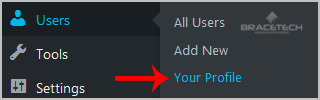
3. Scroll down, and under Account Management, you can see the New Password option. Click on the Generate Password button.
4. Copy the password to a safe place and then click on Update Profile to change your password.
- Home
-
Store
- Browse All
- Web Hosting
- Custom Built Designs
- Digital Marketing
- BRACETech Internet
- CCTV Cameras
- OpenXchange
- VPN
- SSL Certificates
- Website Backup
- Website Builder
- Website Security
- E-mail Services
- SEO Tools
- Site Builder
- Professional Email
- XOVI NOW
- Site & Server Monitoring
- SocialBee
- Register a New Domain
- Transfer Domains to Us
- WP Toolkit
- Announcements
- Knowledgebase
- Network Status
- Affiliates
- Contact Us
- Chat Now
-
More
